Friday, January 13, 2012

Developing for Linux under OS X in XCode


In this mini-article I will show you how I develop applications for Linux in XCode 4. At the moment I’m using XCode 4.2.1, in OSX Lion, with Ubuntu 10.04 running on a virtual machine.
Although the article is related to XCode, after reading and trying out for yourself, you will notice that you can use whatever IDE you like. Here I’m just showing you how you can code in a OSX-only IDE and deploy in Linux.

Requirements

You will need some tools before we start:
  • VMWare or similar virtual machine application for Mac
    • Used to run our Linux system, and that’s where we will compile and run the target application.
      You can also use a physical computer instead. However, you will need network connectivity from mac to that computer because the communication between this linux System and our Mac is done by SSH.
  • OSXFuse
    • Requirement for the next point
  • SSHFS
    • It will be used to mount a remote directory in our Mac, and access it as if it was an external hard disk drive
Once you have all these, we are ready to go, but take some seconds to make sure you can compile the application in your slave Linux system. This will ensure that any problems you may encounter are not related to your slave machine or the code you are trying to compile.

Accessing slave machine using SSH

Now you will need the slave machine’s IP address, typing ifconfig in its Terminal.

As you can see in the image above, in my case I’ll be using 172.16.68.128 as the slave’s IP Address.
Then we make sure we can access it from your Mac typing the next command in Mac Terminal:
ssh username@ip
If we are asked for the password, then we got a valid SSH connection and we can move on…

Adding an alias for the Linux Slave IP

Because IPs can change sometimes, even inside Local Area Network, I added an alias for this IP, so that I could use it in scripts instead of the IP address itself. When it changes, I only have to modify one single file. You can do the same, by editing the hosts file, so grab the Mac Terminal and type as you see:
sudo vim /etc/hosts
Add a new line in the end, pressing I to enter insert mode:
172.16.68.128 vmcode
Now press ESC to exit “INSERT mode” and type :wq (yes, including the colon). If you have any problems using vim to edit this file, you can try nano instead – just replace “vim” with “nano” in the first command of this section. Now, you can use the virtual hostname “vmcode” instead of the real IP (which will be a lot easier to remember).

Setup script files

Now we need to setup two script files. I called them mountDir and sshbuild. The first one will mount the remote directory in our Mac and the latter is used to remotely compile the application.
Firstly pick a directory for these scripts, where you need to place the sshfs-static-leopard file, because it will be needed for the mountDir script.

Mounting Directory Script

Using your favorite text editor, create a new file called “mountDir” (no extension), and paste the following code:
#!/bin/bash
echo password
| ./sshfs-static-leopard username@vmcode:codedir ~/path/to/mount/dir -o password_stdin
I’m explaining some of the variables in the command, that you should change to fit your needs:
  • username and password are the credentials for the user in the slave Linux machine
  • codedir is the directory in slave machine you want to mount in Mac
  • ~/path/to/mount/dir is the path to the Mac’s directory where you want to mount the slave’s directory
If you are using a real box instead of a VM, I recommend you configure ssh public keys instead of storing your password in plain text. You SHOULD NOT use the same password as of your Mac User
This was pointed by reader Daid, and I explained him I used it in plain text because I’m connecting to this VM, used only for compiling purposes and not accessible from outside, so I’m not that worried about it.

Building remotely

The SSH command accepts a second argument, that is the command you want to execute right after the remote login. Save and create another file called “sshbuild” with the following content:
#!/bin/bash
ssh username@vmcode
'cd codedir; make'
Note that username and codedir must match the ones you used before.

Setting up XCode

Before we move to XCode, you first need to mount the directory: open the Terminal, cd to your scripts dir, and run sh mountDir. Now you should see the contents of remote dir in your Mac’s ~/path/to/mount/dir.
Any change you make to these files will be reproduced in the remote slave system (our VM), because SSHFS will be syncing in real-time.
Start XCode, then click File > New > New Workspace… and chose a location for the workspace file (I used the same as the scripts). You should see a window with three different spaces, they should have texts in the middle, from left ro right, saying “No Files”, “No Editor” and “No Selection”. Open a Finder window in the location ~/path/to/mount/ and then drag the subfolder that has a name starting with “OSXFUSE” to the “No Files” space in XCode.

A popup will show up. Firstly, XCode will prompt you about your build tool. You should type the complete path to the sshbuild script, starting on root, on the “Build Tool” field.

After clicking “Next”, you will be presented something like the image below, you should select the second option, which is “Create folder references for any added folders”.

Basically you are adding a reference to that directory, so instead of working in a local copy, you will edit the remote files directly. Now that you have all the directories in the slave’s codedir in the left panel of XCode, you can now open, edit and save any of your files using XCode. Now hit Command+B to run the build tool, and if everything goes well, you should see a message box saying Build Successful.

Running the Application

As you are developing for Linux, you should preferably debug under Linux. However, I often use an Application called X11, taht can be found in your Applications/Utilities folder. Type this command under X11 console window and the application should run in your Mac as if it was on Linux, even if it needs to open windows:
ssh +x username@vmcode
cd codedir
./application

Conclusion

Here I shown you how I develop applications for Linux using the resourceful XCode and all it’s features, without quitting Mac OSX. I hope you found it useful and it helps you by increasing your productivity. Leave a reply, share your thoughts and suggestions and happy coding ;)

Weekend Project: Get to Know Btrfs


  The Butter/Better/B-tree Filesystem, Btrfs, is supposedly destined to become the default Linux filesystem. What makes it special, and what's wrong with good old tried-and-true Ext2/3/4?

Too Many Filesystems

Linux supports a gigantic number of filesystems: removable media, network, cluster, cloud, journaling, virtual machine, compressed, embedded, hardware inter-connect, pseudo-filesystems that live only in memory, Mac and Windows filesystems, and many more.
You are doubtless familiar with the general-purpose Ext2/3/4, JFS, XFS, and Reiser filesystems that we use on our desktop PCs and servers. With all of these filesystems cluttering up the landscape, what is the point of yet another one? (There is even YAFFS: Yet Another Flash File System.)
The point is meeting new needs and workloads, and building functionality into the filesystem rather than relying on a herd of external utilities. Btrfs is rather like a blend of features from ReiserFS and ZFS, Sun's advanced copy-on-write/volume manager/RAID/snapshot/etc. filesystem.
Many Linux users yearn for a native port of ZFS, but its GPL-incompatible license (the Sun CDDL) ensures that Sun's implementation (now Oracle's) can't be included in the Linux kernel.
Even so, you can't keep a good hacker down, and so there are two ports for Linux. One is ZFS on FUSE, which runs ZFS in user-space. It's included in a lot of distros so it's an easy installation. The other one is ZFS on Linux. This is a build of ZFS as a kernel module for users to install, and so you get kernel support without a GPL violation because it is not distributed with the kernel.
It's great having those options to try out ZFS, and I applaud the maintainers of these ZFS projects. Still, it looks like Btrfs is going to take the place that ZFS could have owned were it not for its incompatible license. Oracle is the primary sponsor of Btrfs, and plans to make it the default filesystem in Oracle Unbreakable Linux sometime in 2012. Btrfs isn't just an Oracle project, but has a lot of community support from the Linux kernel team and many Linux distributions. Odds are it's included in your favorite distro. (Run cat /proc/filesystems to see what filesystems your Linux supports.)

Btrfs Features

So what does this amazing super-duper filesystem do? How about a handy bullet-pointed list to answer this question?
  • RAID 0, 1, 10
  • COW
  • Incremental backup
  • Online defrag
  • gzip and LZO compression
  • Space-efficient packing of small files
  • Dynamic inode allocation
  • Checksums on data and metadata
  • Shrink and grow storage volumes
  • Extents
  • Snapshots
  • 16 EiB maximum file size
Planned features include RAID 5 and 6, deduplication, and a ready-for-primetime filesystem checker, btrfsck. You can try out btrfsck now because it is included in btrfsprogs. (Which of course Debian/Ubuntu/Mint etc. changes to btrfs-tools, and Fedora calls it btrfs-progs.) But it is not ready for production systems yet.
Putting the finishing touches on btrfsck is the last big step before Oracle makes it the default filesystem in their next Unbreakable Linux release. Fedora 16 Linux was supposed to default to Btrfs, but now they're aiming for Fedora 17 in May 2012.
I'm a big fan of RAID 10, which is RAID 1+0, mirroring and striping. It is expensive of disks because only 50% of your total disk capacity goes to storage. But it is simple, robust, and fast. Half your disks can fail without losing your data. I got burned out on RAID 5 and 6 years ago; perhaps I had bad RAID mojo, but I experienced a lot of failures, and they are slow. It seemed the systems under my care were more adept at propagating parity errors than operating correctly. So for me, RAID 5 and 6 can sit on the back burner indefinitely as long as I have RAID 10.
16 EiB is exbibytes, a measurement close to the more commonly used exabyte. An exbibyte is 1,024 pebibytes. In comparison Ext4 maxes out at volumes with a maximum size of one exbibyte and file sizes up 16 tebibytes. However you say it, it is a lot.
Btrfs doesn't contain any database-specific optimizations, and is not a clustering filesystem. It is designed to handle very large storage volumes, protect data, simplify large storage management, and read and write fast.

COW, Volumes, Snapshots

A COW – copy on write – filesystem is extra-careful with writing your data. When you make a change to a file, the old data are not overwritten. Instead, the filesystem allocates new blocks for the new data, and only the changed data are given a new allocation. The downside is this creates fragmentation. So Btrfs supports online defragmentation with the
btrfs filesystem defragment
command.
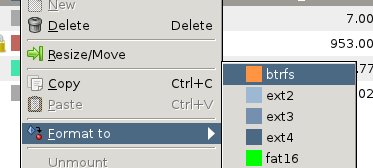
COW filesystems lend themselves to easy, efficient snapshots, and Btrfs supports both snapshots and rollbacks. The easy safe way to try Btrfs is to create a new partition for testing. Gparted supports Btrfs, as you can see in figure 1.


Next, mount this partition. In this example the mountpoint is /btrfs-volume:
# mount -t btrfs /dev/sda8 /btrfs-volume
Now we can create a subvolume in this partition. Subvolumes are cool. They are like independent filesystems inside the parent filesystem, with their own mountpoints and options. Create one this way:

# btrfs subvolume create btrfs-volume/test
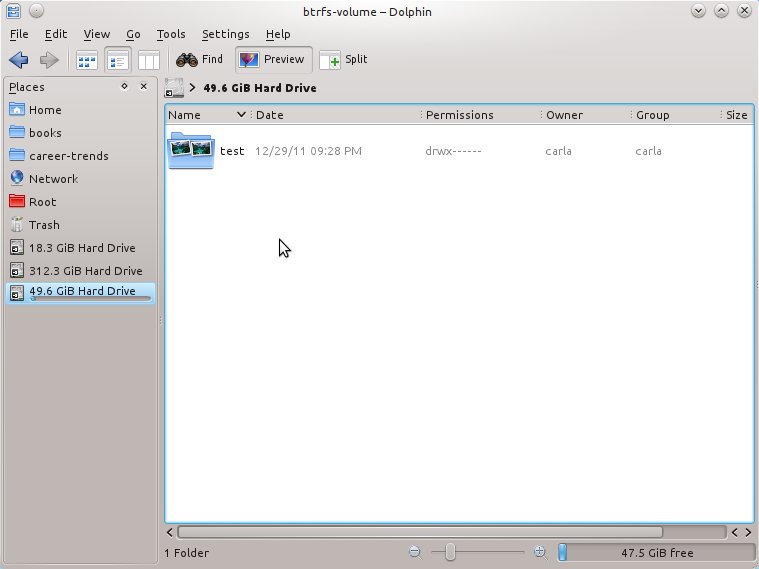
And that's all there is to it. You'll see this as an ordinary directory in your file manager (figure 2). You don't need to worry about allocating space like you do with normal disk partitions, because subvolumes automatically snag whatever space they need from the parent volume as you add data to them. So you can go ahead and copy some files into the test subvolume. You'll need root permissions, or you can futz with the file permissions in the usual way and change them to an unprivileged user.
Now let's create a snapshot:

# btrfs subvolume snapshot btrfs-volume/test btrfs-volume/test-snapshot-1
Create a snapshot of 'btrfs-volume/test' in 'btrfs-volume/test-snapshot-1'
Snapshots are very efficient because multiple snapshots share the same original files and copy only the changes. You can list all the snapshots in the same volume; you need to name one of them and then all of them are displayed:

# btrfs subvolume list btrfs-volume/test
ID 256 top level 5 path test
ID 257 top level 5 path test-snapshot-1

This also shows that Btrfs sees snapshots and subvolumes as the same things. Your snapshots can be copied elsewhere as backups, or mounted independently to different mountpoints. Want to roll back to an earlier snapshot? First set the snapshot as the default. You need the snapshot ID, and then the path:
# btrfs subvolume set-default 257 btrfs-volume/
Then unmount the subvolume, and then remount:

# umount btrfs-volume
# mount -t btrfs /dev/sda8 btrfs-volume

Is that not cool? After creating subvolumes you don't need to mount the parent volume.

Prognosis

Btrfs is still rough around the edges, and the documentation and administration tools are incomplete. If you've used ZFS then Btrfs feels like a clunky copy, because administering ZFS is faster and easier. ZFS has a several-year head start on Btrfs, though. I expect Btrfs will improve rapidly as it becomes more widely used.

Thursday, January 12, 2012

Keep Configs Under Control With Etckeeper


If Unix-like systems were being designed today, they probably would have been planned with some sort of revision control for configuration files. But the system of keeping plain-text configuration files under /etc was designed in a simpler time. Times have changed, and we need a little assistance in keeping up. If you're managing a set of Linux servers for a small business, a tool like etckeeper can help a great deal.

What's etckeeper?

Etckeeper is a set of tools that lets you keep your /etc directory (and all the configuration files under it) in a revision control systems. You can use it with Git, Mercurial, Darcs or Bazaar. Note that you'll need to know the basics of whatever system you choose to use because etckeeper doesn't have special utilities for restoring older versions of files.
You could easily set up /etc with revision control without etckeeper. However, the advantage of etckeeper is that it's designed specifically for tracking /etc, including the file permissions and metadata that the revision control systems do not track.
Etckeeper should be packaged for most major distributions, so all you need to do is download apt-get install etckeeper or yum install etckeeper. If you don't have a revision control system installed, you'll also need to grab Git, Bazaar, Mercurial or another package revision control package of choice. (I was actually surprised to see that the package for etckeeper doesn't include one of these as a requirement.)

Setting Up etckeeper

Note, if you've installed etckeeper on Ubuntu (rather than Debian) it's been configured to use Bazaar instead of Git. You can install Bazaar if you would like, but I already use Git with other projects, so I decided to stay with it for etckeeper as well.
To change this, head to the /etc/etckeeper/etckeeper.conf file and change VCS="bzr" to VCS="git".
Be sure to look around and see if there are other options you want to change. You can add additional options to git (or whatever version control system you like), and change etckeeper's behavior. For example, by default it will commit changes once a day automatically. If this is undesirable, you can add AVOID_DAILY_AUTOCOMMITS=1.
If you don't want to automatically commit the files before running an installation, add AVOID_COMMIT_BEFORE_INSTALL=1. Otherwise, etckeeper works with the package manager to commit files prior to installation. Etckeeper also commits files immediately after install, so you'll have all the new configuration files (if any) checked in as well.
Once etckeeper is installed, run etckeeper init to start the repository.

Working With Etckeeper

Etckeeper is a really light utility for managing configuration files. I default to using Git because I don't feel like learning the Bazaar commands necessary to manage my configuration files.
The etckeeper documentation recommends cloning a repository and working from the clone rather than working directly in /etc. You can also use this to back up your configuration to a new server or to set up a new server with a copy of your existing configuration.
Remember, Git doesn't keep the file permissions. This is where etckeeper comes in very handy: It tracks the metadata and can "fix" the permissions when you run etckeeper init again. This probably seems a bit counter-intuitive, since you might think of init as something you're going to use only when you start a repo -- but you also use it when you're going to be checking out files stored in Git (or whatever).
Hence, if you revert to an older version of a configuration file (for example) you must run etckeeper init again.
If you make any manual changes to a configuration, you'll want to use git commit -m "comment" (where "comment" explains the changes) to add the change immediately.

Larger Sites

I wouldn't recommend etckeeper for large businesses. If you're managing hundreds of servers, then you're going to want something like Puppet or Chef. That gets a bit more complicated, but you also have the option of doing much more with Puppet (or any other IT automation tools) than you can do with Etckeeper.
In the next column, we'll overview Puppet and look at using Puppet for some common administration tasks across multiple servers.

Rackspace Open Sources Dreadnot for Data Center Software Deployment

Open Source software is created in a number of different ways, but the most common is simply when a developer has an "itch." Rackspace's Cloud Monitoring Team had such an itch when it came to having the right tools for the continuous deployment of software to their data centers and that's how the new Dreadnot tool was born.
With Dreadnot, Rackspace engineers are able to push code into production faster than ever. Paul Querna, engineer on the Rackspace Cloud Monitoring team explained to InternetNews.com that their product lives over multiple regions and they wanted whole region coordination to be able to turn a whole region off, upgrade it, test and then do the next region five minutes later.
"A lot of tooling that exists is the low level of going to one server and running a command," Querna said. "Dreadnot is about building the higher level orchestration to help you deal with a distributed system like the cloud."
Querna added that Dreadnot is about reducing the process of deployment down to pressing a button on a webpage instead of it being a lot of manual work. He added that his team had originally started using Deployinator to solve their deployment needs but they ended up customizing it a lot so they built their own tool, Dreadnot.
Querna's team works on Rackspace's Cloud Monitoring capabilities and the core of the technology is an API driven monitoring system. The system has a REST API that lets administrators specify conditions when they want to be alerted to a system event. Dreadnot is used by Rackspace to deploy the cloud monitoring system itself.
"The monitoring system can never go down, so our deployments can not cause down time," Querna said. "That's what drove us to solve the problem really well with Dreadnot."
The way that Rackspace is able to achieve the zero downtime is a combination of architecture decisions and redundant systems.
"Monitoring systems come down to an event flow and we process those events in parallel at separate data centers," Querna said. "Each data center on its own decides whether or not we should send an email or a Web hook and, at the last step, we do the de-duplication."
As such, Querna noted that even if an entire data center is shut down all of the event processing happens at the alternate data center. There is a lot of parallel processing in the Rackspace data center model. The other key component that makes the always-on data center deployment model possible is the open source Apache Cassandra NoSQL database. Querna noted that helps with the multi-region, multi-data center support, as well.
The Dreadnot tool is used as a complement with the open source Chef configuration management tool.
"When a developer spins up everything on their local machine they run a Chef client and it installs everything," Querna said. "On the production side, Dreadnot handles the regions and does some monitoring stuff and then it essentially runs a Chef client on all the servers. It's the trigger to tell Chef to upgrade things on a server. "

Open source

Rackspace is no stranger to the open source world, being one of the founders of the OpenStack cloud platforms among other efforts. The decision to open source Dreadnot came from an understanding that it has broader applicability than just Rackspace's cloud monitoring service.
The project currently is available on Github under an Apache open source license. Querna doesn't expect the project to ever foster a giant community like OpenStack, but it is a project that has already generated some outside interest.
"We would like to have contributions," Querna said.
Sean Michael Kerner is a senior editor at InternetNews.com, the news service of the IT Business Edge Network, the network for technology professionals. Follow him on Twitter @TechJournalist

Tuesday, January 10, 2012

((( بـدأت أخـرج مع امـرأة غـيـر زوجـتـي )))


القصة قصيرة لكن رائعة وهادفة جداً وأتمنى أن تعجبك
بعد 21 سنة من زواجي، وجدت بريقاً جديداً من الحب.

قبل فترة بدأت أخرج مع امرأة غير زوجتي، وكانت فكرة زوجتي
حيث بادرتني بقولها: 'أعلم جيداً كم تحبها ' ... 


المرأة التي أرادت زوجتي أن أخرج معها وأقضي وقتاً معها كانت
 
أمي التي ترملت منذ 19 سنة.
ولكن مشاغل العمل وحياتي اليومية ومسؤوليات 3 أطفال جعلتني لا أزورها إلا نادراً.

في يوم اتصلت بها ودعوتها إلى العشاء سألتني: 'هل أنت بخير؟' لأ
نها غير معتادة على مكالمات متأخرة نوعاً ما وتقلق.

فقلت لها: 'نعم أنا ممتاز ولكني أريد أن أقضي وقت معك يا أمي'. قالت: 'نحن فقط؟!' فكرت قليلاً ثم قالت: 'أحب ذلك كثيراً'.

في يوم الخميس وبعد العمل
، مررت عليها وأخذتها، كنت مضطرب قليلاً، وعندما وصلت وجدتها هي أيضاً قلقة.

كانت تنتظر عند 
الباب مرتدية ملابس جميلة ويبدو أنه آخر فستان قد اشتراه أبي قبل وفاته. ابتسمت أمي كملاك وقالت: 'قلت للجميع أنني سأخرج اليوم مع إبني، والجميع فرح، ولا يستطيعون انتظار الأخبار التي سأقصها عليهم بعد عودتي' 

ذهبنا إلى مطعم غير عادي ولكنه جميل وهادئ تمسكت أمي بذراعي وكأنها السيدة الأولى
 ،

بعد أن جلسنا بدأت اقرأ قائمة الطعام حيث أنها لا تستطيع قراءة إلا الأحرف الكبيرة
 . 
وبينما كنت أقرأ كانت تنظر إلي بابتسامة عريضة على شفتاها المجعدتان وقاطعتني قائلة:
 
'كنت أنا من أقرأ لك وأنت صغير'
أجبتها: 'حان الآن موعد تسديد شيء من ديني بهذا الشيء .. ارتاحي أنت يا أماه'.

تحدثنا كثيراً أثناء العشاء لم يكن هناك أي شيء غير عادي، ولكن قصص 
قديمة و قصص جديدة لدرجة أننا نسينا الوقت إلى ما بعد منتصف الليل

وعندما رجعنا ووصلنا إلى باب بيتها قالت : 
'أوافق أن نخرج سوياً مرة أخرى، ولكن على حسابي'. فقبلت يدها وودعتها'

بعد أيام قليلة توفيت أمي بنوبة قلبية. حدث ذلك بسرعة كبيرة لم أستطع عمل أي شيء لها.


وبعد عدة أيام وصلني عبر البريد ورقة من المطعم الذي تعشينا به أنا وهي مع ملاحظة مكتوبة بخطها: 


'دفعت الفاتورة مقدماً. كنت أعلم أنني لن أكون موجودة، المهم دفعت العشاء لشخصين لك ولزوجتك. 
لأنك لن تقدر ما معنى تلك الليلة بالنسبة لي ... أحبك يا ولدي'.

في هذه اللحظة فهمت وقدرت معنى كلمة 'حب' أو 'أحبك'
وما معنى أن نجعل الطرف الآخر يشعر بحبنا ومحبتنا هذه.

لا شيء أهم من الوالدين وبخاصة الأم ... إمنحهم الوقت الذي يستحقون

أتمنى أن أكون سبباً في تغيير بعض من قرأها طريقة تعامله مع أحد والديه أو كلاهما

Monday, January 9, 2012

Forgot the root password of your linux box ?


So you forgot your root password of your linux box?, well its not the end of the world if you do have physical / KVM over IP access to your box, you can start it on single user mode and reset it. Don’t know how?… then read on.

In all honesty, this fix really depends on which boot loader your box is running. Normally on modern Linux distros the loader will be GRUB.

In this case, how to get into single user mode using Grub boot Loader?

Restart your box, and when the GRUB splash screen appears follow these steps:
  1. Select/highlight the kernel you wish to boot using the up/down arrow keys.
  2. Press the e key to edit the entry.
  3. Select/highlight the line starting with the word kernel.
  4. Press the e key to edit the line.
  5. Append the letter S to the end of the line.
  6. Press ENTER to accept the changes.
  7. Press the b key to boot the kernel with the modified command line.
This will take you into single user mode and should provide a bash shell to execute commands.
From this point on you probably can use the passwd command to change the root password.
In you are using the LILO boot loader, when you see the LILO screen press CTRL+X, you will see boot propmt
boot:
Here after boot: type
linux single
This will boot the system in single user mode. When you reach the # prompt, type:
passwd root
Once you reset the password you can then type init 3 or init 5. init 3 will start multi user boot without X and init 5 will start multi user mode with X/


If LILO is not set to wait at the boot menu, you can halt the boot process by pressing any key in the split second before lilo tries to boot the kernel.
By the way, in case you want to change the lilo timeout value, you can do it from:
/etc/lilo.conf  ( 0 means no wait )
once changed type:
lilo -v

Wednesday, January 4, 2012

26 helpful open source network management tools

Over the last decade or so, open source development has skyrocketed, and network management software has ridden that wave. Many frustrated IT administrators have turned to free tools to monitor, configure and map their networked devices. Here are 26 examples of open source network management software tools to help you do your job.


Big Brother BTF
Big Brother was created in the mid-1990s to monitor networked systems. Since its introduction, its author made a commercial version, now called Big Brother Professional Edition and acquired by Quest Software in 2001. The open source version is still available for students and non-commercial users.


Big Sister
The author of Big Sister says he was impressed by Big Brother but wanted to change it in a number of ways. In his Readme file, he says he wanted to improve the performance, reduce the number of alarms when something goes down, and make other enhancements.


Cacti
Cacti is a graphing tool that can be used to show network data over time, such as CPU load or bandwidth utilization. It is a front end to RRDtool, an open source database tool for storing data that changes over time.


GroundWork Monitor
GroundWork is a platform for monitoring networks, applications and clouds. The software is available as an open-source Community Edition, but the company pushes its Flex version with a per-device, per-year charge – or even its Quickstart version, which has more limited support but only costs $49 per year for 50 devices.


Hyperic HQ
Hyperic HQ is intended for monitoring custom web applications and monitoring their performance across physical, virtual and cloud environments. There is a paid Enterprise version that improves on the alerting function and is better able to create baselines.


JFFNMS
The Just For Fun Network Management System isn't really. From the description: "Despite the name, the program is a serious NMS that can help you look after your routers, switches, servers and other network equipment." It is written in PHP and monitors via SNMP.


MRTG
The Multi Router Traffic Grapher is a well-known, simple tool for monitoring traffic moving through SNMP-enabled network devices and, well, graphing it.


Munin
The site for Munin tells us that Munin was a raven in Norse mythology who would fly around and tell the god Odin what was going on. In a network management context, the site says Munin monitors networked resources, answering questions like, "What just happened to kill our performance?"


Nagios Core
Nagios Core is software for monitoring IT infrastructure and viewing current status, historical logs, and basic reports. Nagios and other companies have built commercial capabilities onto the open source core.


NetDisco
NetDisco autodiscovers networked devices via NSMP and creates pictures of your network. The site says it would most often be used to locate devices, create an inventory and report on IP address and switch port usage.


Net-SNMP
Net-SNMP is a suite of applications that uses SNMP versions 1 through 3, over both IPv4 and IPv6. It can get information from SNMP-enabled devices, receive SNMP notifications, and other functions.


NetworkAuthority Inventory
Starting out as open source project ZipTie five years ago, NetworkAuthority Inventory continuously discovers and tracks networked devices. It can back up and restore device configurations, and compare configurations between devices. It is free for internal business purposes.


Ntop
Ntop shows the top consumers of a network's resources, sorting by protocol or other criteria. It works with NetFlow and sFlow.


Observium
Observium is an autodiscovering network monitoring tool. According to the site, "Its design goals include collecting as much historical data about devices as possible, being completely autodiscovered with little or no manual intervention, and having a very intuitive interface."


OneOrZero AIMS
OneOrZero AIMS is a management tool that includes a help desk, knowledge base, time manager and reporting system.


OpenNMS
Started in 1999, OpenNMS provides event management, service monitoring and performance measurement. The software has no licensing cost; you pay for consulting, training and support.


OpenQRM
OpenQRM is management software geared toward data centers with lots of virtual machines. It supports several virtualization technologies, from KVM to VMware to Xen.  It even configures Nagios with its information.


Opsi
Opsi (Open PC Server Integration) is a client management system for Windows clients. The system itself runs on Linux servers. It will install operating systems, applications and patches. It can keep hardware and software inventories and manage licenses.


OTRS
OTRS (Open Technology Real Services) provides help desk and IT service management. OTRS Group offers consulting, support, customization and hosting services. An OnDemand version delivers the help desk function as software-as-a-service.


Pandora FMS
Pandora FMS monitors systems and applications, detecting problems like memory leaks, website defacements or network interface failures.


RANCID
RANCID sounds like a negative name, until you learn that it stands for Really Awesome New Cisco config Differ. What that means is it monitors a router's or other device's configuration and maintains a history of any changes. And also, despite the name, RANCID supports many vendors' devices, including Juniper routers, HP switches, Redback NASs, and many others.


TclMon
TclMon is network monitoring software written in platform-independent Tcl. A server gathers information from network devices, and a client provides the data visualization. It automatically maintains a list of hardware and software configurations and maintains the network topology.


Wireshark
Originally called Ethereal, Wireshark is billed as "the world's foremost network protocol analyzer" and a lot of IT folks agree. It captures network traffic, performs deep packet inspection on it, and allows full analysis offline.


Xymon
Formerly called Hobbit, Xymon monitors servers, applications and networks, offering information about the health of all of those networked components via web pages. Its site says it was inspired by Big Brother, and like Big Sister, it attempts to address perceived shortcomings of Big Brother BTF, such as performance. Xymon is also intended to be easier to deploy and is free.


Zabbix
Zabbix is intended as an enterprise-class distributed monitoring system. Features include real-time monitoring, autodiscovery and mapping, and scalability.


Zenoss Core
Zenoss Core does availability monitoring, performance monitoring and event management. A commercial version is also available from Zenoss Inc.