Sunday, March 27, 2011

جديد القذافيات

قريبا بالأسواق 
الصحيح الكافي لتفسير كلام القذافي
*******
اللهم اقذف القذافي بقذيفة مقذوفة تقذفه في مقذفة التاريخ
********
عاجل
الجزيرة:
إبليس يصرح أنّه
غير مسئول عمّا يدور في دماغ القذافي
*******
القذافــي :
قدمت استقالتي من الحكم، لكني كرئيس للدولة لم اقبل الاستقالة
*********
لا رجــوع إلى الأمـام. نظـرية القـدافي الـجـديـدة
*********
عاجل
القذافى : الذين ماتوا فى المظاهرات سوف يندمون اشد الندم
*******
الى كل شخص لم يفهم على خطاب معمر القذافي اليكم النص الذي قرا منه خطابه .....
.
.
خطاب القذافي: أيتها الجماهير العريضة أين كنتم أنتم؟ بهب سعح كيه جقز شهث سها ينخمك والإمبريالية التوسعية، وين كنتم أنتم؟ عصخ كطح صهخ رء فخه طقخ وأمريكا حاربناها والسادات حاربناه ويهكق حضئ قهك فلا ها الإمبريالية التوسعية، وين كنتم أنتم؟، هؤلاء الموتورين الجرزان ها ضغف كزو خهع لايغ طجد الإمبريالية التوسعية
************


تفسير و ملخص خطاب القذافى أمبارح
:
إن الليبيين لازم يتحالفوا مع إخوانهم الليبيين ويثوروا على الليبيين علشان ليبيا تنتصر فى النهاية على كل الليبي
********
القذافي في مذكراته يؤكد أن السبب الأصلي للطلاق هو الزواج
 *********
القذافي سمع أن ابن علي "في غيبوبة" . . . ذهب للبحث في الخريطة : كم تبعد "غيبوبة" عن ليبيا؟؟
 ********
 القذافي في خطابه : "اخرجوا الليلة ابتداء من الغد
 *********
 دخل القذافي جهنم لقى فرعون فسأله : مين أنت ؟؟ قاله فرعون : أنا فرعون مصر ........... وأنت مين ؟؟ قله : أنا قذافي ليبيا ...... قاله فرعون : هلا والله جيت و الله جابك إلنا شهر أنا وعمك أبو جهل وعمك أبو لهب بنحاول نفهم شو اللي بدك ياه من خطابك تعال اقعد واشرحلنا
**********
أزياء القذافي........
. برعاية
سيدار
**********
أصبح شعار المظاهرات الجديد في ليبيا.
. الشعب .. يريد .. تفسير الخطاب
**********
كنا بنقول إن مبارك دكتاتور لأن في حكمه مر عليه خمس رؤساء أمريكان .. طب نقول أيه للقذافي اللي مر علية ٣ رؤساء مصريين!!!
********
منظمة محششين بلا حدود تطالب القذافي بالإفصاح عن الصنف الذي يتعاطاه

Thursday, March 10, 2011

Collectd, system performance statistics on Linux


collectd
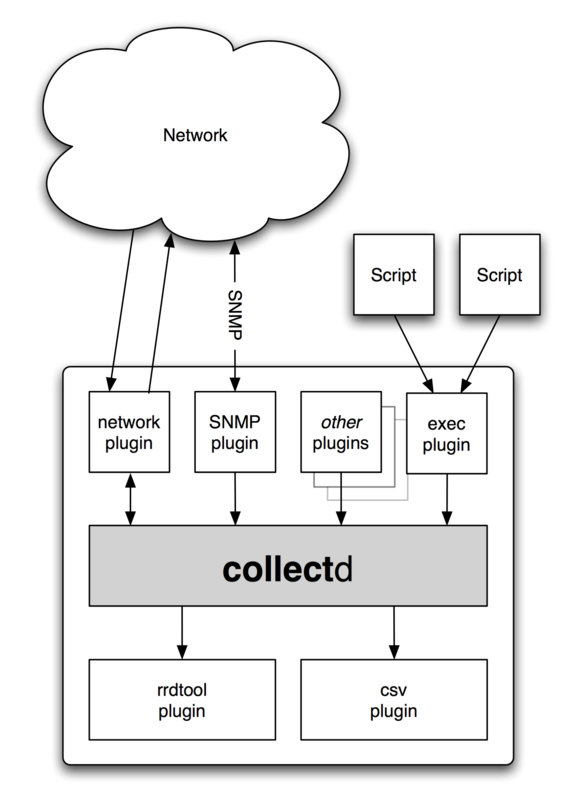
In these days I have seen in a somewhat more detailed way collectd, an excellent tool for collecting statistics on various aspects of our Linux servers.

From Wikipedia: “collectd is a UNIX-daemon which collects, transfers and stores performance data of computers and network equipment.

The acquired data is meant to help system administrators maintain an overview over available resources in order to detect existing or looming bottlenecks.

The first version of the daemon was written in 2005 by Florian Forster and has been further developed as free open-source project.

Other developers have written improvements and extensions to the software that have been incorporated into the project.

Most files of the source code are licensed under the terms of the GNU General Public License, version 2 (GPLv2), the remaining files are licensed under other open source licenses”

Why collectd?
There are other free, open source projects that are similar to collectd – a few links are listed at the end of the article.

So why should you use collectd? There are some key differences of collectd.

For one, it’s written in C for performance and portability, allowing it to run on systems without scripting language or cron daemon, such as embedded systems.

At the same time it includes optimizations and features to handle hundreds of thousands of data sets.

It comes with over 90 plugins which range from standard cases to very specialized and advanced topics.

It provides powerful networking features and is extensible in numerous ways. Last but not least: collectd is actively developed and supported and well documented.

Features

Modularity / Portabilitycollectd
Everything in collectd is done in plugins.

Well, except parsing the configfile.

This means that the main daemon doesn’t have any external dependencies and should run on nearly anything that has heard of POSIX.

The daemon has been reported as working on Linux, Solaris, Mac OS X, FreeBSD, NetBSD, and OpenBSD. It’s likely that other UNIX® flavors work to some extend, too.


Reasonable defaults


collectd’s configuration is kept as easy as possible: Besides which modules to load you don’t need to configure anything else, but you can customize the daemon to your liking if you want.


Build to scalecollectd is able to handle any number of hosts, from one to several hundred (or possibly thousand, but no one has reported that yet).

This is achieved by utilizing the resources as efficient as possible, e. g. by merging multiple RRD-updates into one update operation, merging the biggest possible number of values into each one network packet and so on.

The multithreaded layout allows for multiple plugins to be queried simultaneously – without running into problems due to IO-latencies.


SNMP supportThe Simple Network Management Protocol (SNMP) is in widespread use with various network equipment, for example switches, routers, rack monitoring systems, thermometers, UPSes, and so on.

The SNMP plugin provides a generic interface to the SNM-protocol which you can use to query values and dispatch them over collectd’s mechanisms, e. g. transmit them to a server instance somewhere else.


Integration with monitoring solutionsWith version 4.3 the concept of notifications and thresholds has been added to collectd. This allows you to send notifications through the daemon and allows for simple threshold checking.

However, collectd is not a monitoring solution. We will probably add some features to make the notification system more usable, but at the moment collectd is no match for a sophisticated monitoring solution.

To make it possible to integrate collectd into the popular monitoring solution Nagios, a “check” has been written for that.

It’s called collectd-nagios and allows you to use Nagios to monitor if certain values have been collected and if they were in an appropriate range.


Plugins example
Plugin-cpu
CPU
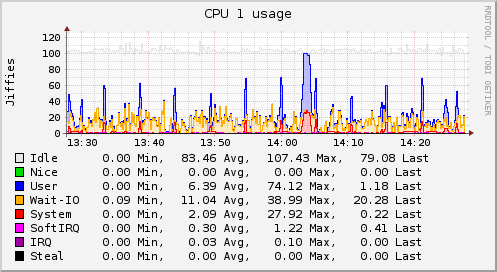
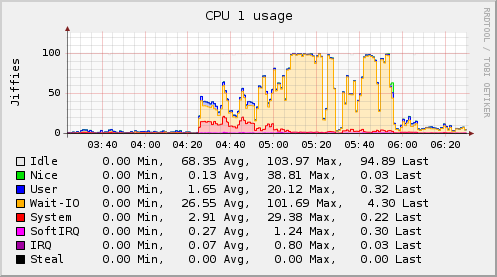
The CPU plugin collects the amount of time spent by the CPU in various states, most notably executing user code, executing system code, waiting for IO-operations and being idle.

This since has been an FAQ: The CPU plugin does not collect percentages. It collects “jiffies”, the units of scheduling.

On many Linux systems there are circa 100 jiffies in one second, but this does not mean you will end up with a percentage.


Apache
The Apache plugin queries the page generated by mod_status, the status module of the Apache web server, parses it and submits the number of bytes transfered, the number of requests received, and the number of processes in the various states of the scoreboard.

Memory
The Memory plugin collects physical memory utilization.

The values are reported by their use by the operating system. Under Linux, the categories are:
* Used
* Buffered
* Cached
* Free

Java_memory_eden_space


GenericJMX
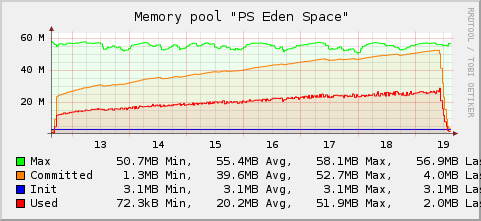
The GenericJMX plugin reads Managed Beans (MBeans) from an MBeanServer using JMX. The plugin is written in Java and requires the Java plugin to function.

The Java Management Extensions (JMX) is a generic framework to provide and query various management information.

The interface is used by the Java Virtual Machine (JVM) to provide information about the memory used, threads and so on.

These basic performance values can therefore be collected for every Java process without any support in the Java process itself.


MySQL
The MySQL plugin connects to an MySQL-database and issues a SHOW STATUS command periodically.

The command returns the server status variables, many of which are collected. The plugin has successfully been tested with the MySQL versions 4 and 5.

Reference:

Main site of Collectd


Similar projects
The following is a list of projects similar to collectd and a short note on how they differ from collectd.

Projects that focus on monitoring and do some performance measurement on the side are not on this list.
  • Ganglia
    Focus on compute clusters and basic system statistics.
  • Munin
    Data is collected by forking / executing plugins (i. e. scripts).
  • eLuna Graph System
    Written in Perl; relies on cron; local system only.

Popular Posts:

Tuesday, March 8, 2011

5 Excellent Linux Media Servers for the Enterprise

You can share your music, videos, and photos on your network via regular folder shares, but using a media server gives you additional functionality and lets you stream to more devices.


A Linux media server has a home in the enterprise because it's a superior tool for storing, archiving, and sharing company multimedia presentations.


Here are five different media servers that you can run on Linux machines:

MediaTomb

MediaTomb is an open source UPnP media server, implementing the UPnP MediaServer V 1.0 specification, released under the GNU General Public License (GPL).


It runs on x86, Alpha, ARM, MIPS, Sparc, and PowerPC with support for Linux, FreeBSD, NetBSD, and Mac OS X.


MediaTomb lets you watch or listen to your media from UPnP compatible media players and devices.


There's on-the-fly transcoding for converting content format not supported by the player or device.


In addition to browsing and playing your media you can view their metadata, such as album and artist or photo details, with EXIF thumbnail support.


You can even watch YouTube videos and create links to other Internet content to stream them via UPnP.


You're also provided with a web interface where you can add/remove/edit/browse your media from your computer or device with a browser.

There are binary packages available for Fedora, Debian and Ubuntu, Mac OS X, and several other distributions.


MediaTomb has a highly flexible configuration, giving you  ample control of the server. They offer great documentation on compiling from source, customization, and the user interface.

Jinzora Media Server
This is an open source web-based media streaming and management system, written in PHP and licensed under the GNU General Public License (GPL).


It can install on web servers supporting PHP in Linux, Windows, Mac OS X, and other platforms.


It can also be embedded in a content management system (CMS) or in another PHP-based application.


Its Groupware feature even lets you create a social network or community to discuss, request, and rate content.


Jinzora's themeable web interface doesn't only let you play or stream your media. It serves as an online media library, letting you create play lists and organize, search, and rate content.


Metadata is also supported. It even tries to download missing metadata, such as song lyrics, album covers and artist biographies.


Content can be played directly from the web interface. It can also be accessed via an external software or hardware player using the Streaming mode or pushed out to a player with the Jukebox mode.


Content can be transcoded or resampled to a media format or bit rate supported by the player.


For system requirements and installation help you can visit their help site.

Wizd
Wizd is an open source media server for Syabas-based media players and is released under Public Domain license.


It runs on Linux, Windows, and NAS platforms, requiring less than 10 MB of disk space. It streams to most media players with the Syabas middleware, including the following:
  • Buffalo LinkTheater
  • DigitalRise Xstream Player
  • H&B DNX-8620
  • I-O Data LinkPlayer
  • Omisys DVD PN210V
  • Pinnacle SC 200
  • Quartek I-Box 800
  • Quartek WHD-500
  • Snazio Net Cinema
  • Transgear DVX 500
  • Transgear DVX 700
From your media player you can browse your media through customizable skins. Thumbnail mode lets you easily preview your pictures and the bookmark feature lets you save your spot on MPEG movies. You can also read standard and ISO image DVD backups.

Firefly Media Server

The open source Firefly Media Server uses Apple's Digital Audio Access Protocol (DAAP) to share content with iTunes, Rhythmbox in Linux, and other players that support DAAP.


It's beneficial if you don't want to install or run iTunes on all PCs. It also features on-the-fly transcoding for converting content format not supported.


It's relatively easy to install and use, and features a web-based interface. Though the project isn't under active development, you may still be able to find packages for your distribution under the name mt-daap. Roku also provides the server for Windows and Mac OS X.


MythTV
MythTV  is much more than a traditional media server. Its main function is a digital video recorder (DVR) that gives you similar TV viewing, recording, and play-back functionality to what cable companies provide with set-top-boxes.


It can run on Linux, BSD, MacOS X, and Windows. It is an open source project distributed under the GNU General Public License (GPL). Since 2002 it has been under relatively heavy development and seems to be well maintained.


MythTV lets you watch and record analog and/or digital TV, including HDTV. You can pause, skip, and rewind live or recorded TV.


It features automated commercial detection and skipping so you see just the good stuff. You can also watch and archive DVDs.


The parental controls can help you limit what your children watch. You can manage the settings and recording schedule on the TV or remotely via a web browser.


In addition to the DVR functions, MythTV plug-ins give you the ability to stream photos and videos.


MythTV is comprised of server and client components. You can run the server and client on the same machine, or have one or more servers and clients depending upon how many TVs you want to setup.


Remember, you'll need at least one TV tuner card on the server. Some computers or video cards may also have an S-Video output you can use to get the MythTV interface onto your TVs.


Though MythTV provides great documentation, you may find the preparation and configuration of MythTV relatively lengthy.


Since you're working with video, the higher performance of the server and/or client PCs, the better.


The amount of streams you can simultaneously capture and watch is limited to the performance of the PCs.

Top 5 Media Center Applications for Linux


We have discussed a lot about multimedia applications available for Linux, but never really about media center applications specifically. Unlike many other niches where Linux lags behind other proprietary OS's in terms of good applications available, Linux have a clear upper hand when you consider the sheer number of very good open source media center applications available out there. Here is a quick listing of top 5 media center applications for Linux. Read on.

XBMC Media Center

Top 5 Media Center Applications for Linux

Probably the most popular open source media center application out there. Plenty of users already and you won't have any problem finding support. The latest release comes with new add-ons system which means even more skins, plugins, visualizations, add-ons for XBMC which are not only awesome but also very easy to install and use.
Boxee
Boxee in Linux

Boxee is based on XBMC and Boxee is my favorite media center application for Linux. It is very easy to use, quite stable already and has a ton of applications to play around with. Live news support is the latest inclusion into Boxee along with many UI improvements. Boxee is slowly but surely becoming *the* ultimate open source media center application out there.
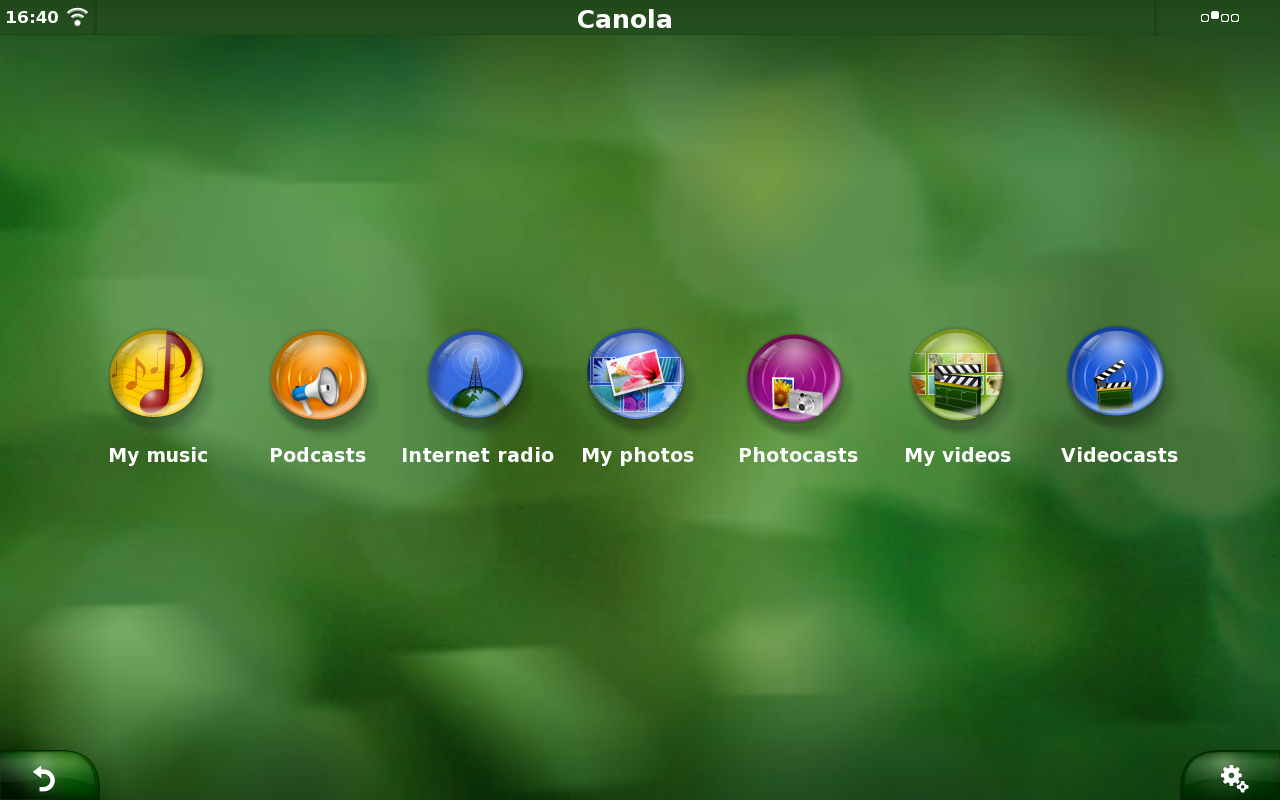
Canola Media Center

Canola Media Center

Canola is a open source media center application which was primarily built for smart phones and netbook devices. Canola Media Center was a total surprise for me when I tested it for the first time some months back. Interface is down to earth simple and very responsive too. Unfortunately, Canola PPA is not available for Ubuntu 10.10 and hence I was not able install it in my machine. But, if you are using Ubuntu 10.04, you should check out the below link. 
Element OS
Element OS

As the name indicates, Element is not alone a standalone application and instead Element OS is a 32 bit Xubuntu based distro for HTPCs(Home Theatre PCs). It maintains compatibility with Ubuntu repositories. It uses the Advanced Packaging Tool(APT) with Element's own custom repositories and the Ubuntu repositories. Read our previous post on Element OS.
GeeXboX
GeeXboX

Like Element OS, GeeXboX is not a standalone application and instead it’s a fully featured OS. GeeXboX is basically a free and open source media center purposed Linux distribution for embedded devices and desktop computers. GeeXboX media center optimized Linux distro is based on Enna media center application.
Hope you guys enjoyed the listing. Among the lot, Boxee is still my favorite along with Canola Media Center(if only it had a Ubuntu 10.10 package). Similar posts in this category include: 18 applications to install in your Ubuntu | Top 5 bit torrent clients for Linux.

Wednesday, March 2, 2011

The proper use of redirection with sudo


We are faced with a problem when trying to redirect with sudo, as the second part of the command is not executed with root privileges.

sudo command > outputfile


<>—-root——<>—user—<>

The solution is to use;


‘sudo tee’ instead of the ‘>’ operator,
‘sudo tee -a’ instead of the ‘>>’ operator.

sudo command | sudo tee outputfile


<>—–root—–<>——-root——<>

The problem can be seen using a simple demonstration:

petur@laptop:/tmp$ sudo date > output
petur@laptop:/tmp$ ls -l
total 4
-rw-r--r-- 1 petur petur 30 2010-07-06 23:14 output

petur.petur is the owner of the output file.

petur@laptop:/tmp$ rm output
petur@laptop:/tmp$ sudo date | sudo tee output
Tue Jul  6 23:15:31 CEST 2010

petur@laptop:/tmp$ ls -l
total 4
-rw-r--r-- 1 root root 30 2010-07-06 23:15 output
root.root is the owner of the output file

Tuesday, March 1, 2011

10 Reasons Why SSDs Are Better Than Mechanical Disks


Have you ever heard the terms, head crash or stiction? Better yet, have you ever experienced either of them?

These terms are just two of the unhappy occurrences associated with mechanical disks. What if disks didn't spin?

What if there were a way to create rewriteable storage in such a way that there were no platters, no spindles and no heads?

You'd have a solid state disk with no moving parts. Solid state disks (SSDs) are all the rage for server vendors, SAN vendors, and appliance manufacturers.

Why? Not because they're cheap -- they're not. SSDs have several advantages over traditional mechanical (spinning) disks. Here are 10 of the most frequently quoted advantages of SSDs over mechanical disks.

1. Life Expectancy

Mechanical drives have an average life expectancy of three to five years. Many fail long before the lower end of the average, and few last beyond the upper end of the average. At three years, you should seriously consider a refresh. At five years, you're skating on ice so thin it's really just very cold water. Alternatively, SSDs have life expectancies reaching into decades, although trusting the 1 million to 2 million hour SSD expectancy claims seems as ridiculous as the 500,000-hour claims of mechanical drive manufacturers. Expect your SSDs to last two to three times longer than mechanical drives.

2. Performance

Since SSDs have no moving parts, their access and seek times are many times faster than those of their mechanical counterparts. Mechanical drives have high-burst speeds, but their sustained speeds are unimpressive by SSD standards. However, write performance is not significantly different between the two technologies*. Therefore, read and access performance-heavy workloads will benefit from SSDs, while workloads that are write-intensive would do as well with the less-expensive standard disks.

3. Physical Size

You usually see standard disks in 3.5 inch or 2.5 inch formats, but SSDs take small form factor two steps further with 1.0 inch and 1.8 inch disks. These smaller sizes allow manufacturers to build smaller appliances, mobile systems and blades that occupy very little space. With rack space at a premium, that's a very good thing.

4. Shock Resistance

SSDs are a good choice for mobile systems due to their resistance to drops, bumps and g-forces. Such forces don't often act on standard concrete and steel data centers, but what about mobile ones -- mobile data centers such as those used by ground military forces, aboard ships, on aircraft or at trade shows? Movement can have devastating effects on mechanical drives, especially during write events. SSDs, again having no moving parts, aren't affected by mobility and are well-suited to such physical abuse. SSDs can withstand up to 1,500 g during operation or 25 times that of a standard drive.

5. Failure Rate

Any mechanical or electrical device can, and will, fail, but your chances are greater for failure when those parts are in motion. Mechanical disks are not particularly robust and can fail at any time, as one manufacturer's representative once stated, "Any time between 15 seconds and 10 years." While SSDs haven't reached the adoption level of mechanical drives, manufacturers estimate very low failure rates compared to standard technology.


6. Power Loss Protection

Enterprise-class SSDs rely on power failure circuitry to monitor voltage changes. If the voltage drops below the threshold, a secondary voltage hold-up circuit ensures that the drive has sufficient power to save any pending writes to disk. A supercapacitor, a discrete bank of capacitors or a battery acts as this secondary voltage hold-up circuit.

7. Power Consumption

SSDs draw very little power. Even at a full sprint, SSDs consume approximately three Watts or less compared to six or more Watts by standard disks. However, most impressive is the power consumption of quiescent drives. SSDs sip from 0.05 Watts to 1.3 Watts, while their gluttonous counterparts gobble at a rate of 4 Watts or more. You will pay more for an SSD, but the long-term cost reduction might offset the initial sticker shock.

8. Heat Dissipation

Everyone knows heat kills electronic performance. That's why data centers have to stay at those chilly temperatures. SSDs reduce heat dissipation significantly compared to their spinning cousins. Less heat loss means lower cooling requirements, which in turn means reduced costs. Less heat to move away from sensitive electronics also means that system fan sizes can shrink along with your power consumption. Mechanical drives are responsible for more than 70 percent of the heat generated from a system. Without them, you could realize sizable savings and longer lasting hardware.

9. Hot Plug/Unplug Ability

It might not surprise you to know that SSDs have hot plug and unplug capability. However, it might surprise you to know that since SSDs don't have to "spin up," their capacity is available immediately upon plug-in. Although it might take several seconds for your operating system to recognize the drive, you will not have to wait through a lengthy discovery process or an even lengthier reboot.

10. Noise

If you've ever stood in a data center, you probably noticed the very high noise level. Imagine a data center filled with SSDs instead of standard drives. Other than the sound of system fans, cabinet fans and the central air conditioning system, the data center becomes significantly quieter. As noted in the Heat Dissipation entry, fans would likely experience a 'downsizing' as well and further reduce the ambient noise level.

* Some independent tests conclude that SSDs write two to three times faster than standard hard disks. However, there are studies that suggest the differences are not so marked.

Monday, February 28, 2011

الخطايا العشر التي قضت على مبارك


بقلم- خالد البرماوي:

كان نظام الرئيس السابق مبارك، كريما في أخطائه، سواء في عددها أو في ضخامتها، ويعود هذا لجرأته وغروره في ارتكابها، وظنه، أنه يحكم شعبًا من "الجثث"، التي لا تثور ولا تغضب.. وجاءت أخطاء مشهد ما قبل النهاية كمحفزات و"مغيظات" للناس كي تثور.. ابرزها بلطجته في إدارة انتخابات مجلس الشعب التي حصل فيها علي 95% بشفافية !! وسلق القوانين وتفصيلها، وغلو المعيشة  والبطالة المزمنة وجباية الضرائب دون فائدة، هذا غير الفساد المفضوح من سرقة ونهب أموال وارضي الدولة، الذي كانت تتم "عيني عينك. جهاراً نهاراً".

ورغم أن هذه الممارسات العنيفة "سياسيا"، كانت احد الاسباب الرئيسية لغضب الناس وخروجهم في 25 يناير، إلا ان اخطاء مشهد النهاية وحدها كانت كارثية، وعجّلت بنهاية النظام بشكل سريع، وهو ما نستطيع ان نقول عنه، بارتياح وشماتة كبيرة ، لا نخجل منها "على نفسها جنت براقش".. وإليكم عشرة اخطاء من وجهة نظري قضت علي نظام مبارك "بدري بدري.. في 18 يومًا فقط". 

1- غيبوبة البداية: عدم توقع حجم وطريقة وخريطة سير المظاهرات، فقبل يوم 25 يناير، كان الأمن يتعامل بشكل عادي مع هذا الحدث، ماعدا بعض التحركات الروتينية.. رغم انه، حسب علمي، عُقِد اجتماع "هاتفي" ضم وزير الداخلية السابق والرئيس السابق مبارك، وصفوت والشريف وزكريا عزمي وفتحي سرور، وحذّر فيه الأخير من خطورة هذه التظاهرات، التي كانت منتشرة في كل مكان على الانترنت،  إلا أن وزير الداخلية، قال لها بتناكته المعهودة – كما اتخيل- اطمئنوا كله تحت السيطرة.

2- ثورة مستوردة: مصر مستهدفة.. وقلة مندسة.. وأجندات خارجية، وخيم وأموال أمريكية في ميدان التحرير،  ثم دخلنا  في قصة وجبات كنتاكي ، وجواسيس اسرائيليين، وأيادي إيرانية تعبث !!، وتواجد ميداني قوي من حماس – اقسم بالله ان احد الوزراء قال انهم كانوا يرفعون اعلامهم في ميدان التحرير-.. وطبعا هذه الرسائل المُلفّقة والكاذبة، خرجت من النظام البائس الغبي من فعل الصدمة، مما يؤكد انهم كانوا مهزوزين ومرعوبين ع الاخر.. ويكفي أن صفوت الشريف صرح لبرنامج "الحياة والناس" يوم 26 يناير، بأن ايادي خفيّة تعبث بأمن واستقرار مصر.. وفي نفس الوقت وعلى نفس القناة، لبرنامج آخر هو "الحياة اليوم"، فتحي سرور صرح بأنها ثورة من الشباب لمطالب يمكن النظر في تحقيقها.


3- الاستخفاف بالشباب: وصل بهم الحد الي التجريح في الشباب وتجاهل أي حديث عن الشهداء، بل ان الصحف القومية اعتبرتهم "قتلي" وليسوا شهداء، 
 وهذه  كانت سمة رئيسية لتعامل النظام في كل مراحل الثورة.. هذا الاستهانة بالشباب وبأدواتهم البسيطة، من الانترنت والشبكات الاجتماعية والهواتف المحمولة وقدرتهم على التنظيم، جعلت النظام لا يعطي الشباب قدرهم، وبالتالي؛ لم يستطع أن يتعامل معه بالكفاءة واليقظة المطلوبة.. لهذا كانت المفاجأة ضخمة والتراجع سريعًا ومريعاً.. لأنهم ببساطة اعتمدوا على ادوات سياسية بالية ليست في قواميس الشباب، مثل "الرئيس الرمز والأب"، والفراغ الدستوري، والقمع الأمني، ثم الانفلات الامني، ثم الخسائر الاقتصادية، بينما الشباب كان يتعامل مع الامور باعتبارها، قضية حرية وديمقراطية وكرامة وعدالة انسانية.. والنظام كان يراها قضية أمنية بحتة وليست سياسية او حتى حقوقية .


4- خطابات الرئيس: نستطيع أن نقول عنها بأريحية شديدة إنها كانت مملة.. ورسائلها متأخرة دائماً، و"يطق من جنباتها" العند والتعالي والغرور، حتى القرارات التي كانت تأتي بها، دائماً ما تكون متأخرة بخطوة عن مطالب الثوار.. ولو عُدنا إلى يوم 25 يناير، كان يكفي قرار - وليس خطاب - بإقالة الحكومة لتهدئي من المتظاهرين .. ولكن مؤسسة الرئاسة، كانت تعاند بصلف شديد، وترفض ان تكون في موقع رد الفعل، فاستمرت في عنادها؛ واستمرت الثورة حتى كتب لها الله  ان تنجح، لأن الله أرادَ أن يعمي النظام السابق، عن أي قرارات سليمة تصدر في وقتها، وتمتص غضب الشعب، وكلنا يعرف مدى عاطفة الشعب المصري؛ ولكن الله ستر..

5- التغطية الإعلامية الرسمية: بإجماع  منقطع النظير كانت ضعيفة، ومضللة ومفبركة، وغير مهنية اطلاقة، استخدمت أبواق تقليدية لا تحظي بأي مصداقية، وهذه الأخطاء الفادحة جعلت النظام يخسر وسائل إعلامه الرسمية، ومن الجولة الأولى؛ حتى عندما حاول أن يستخدم بعض القنوات الخاصة كان الوقت قد فات لكي تقوم بدور مؤثر، لأنها هي الأخرى كانت متحفظة وسلبية للغاية، خاصة في الأيام الأولى للثورة.. لهذا كان اتجاه الناس، ومنذ البداية، نحو قنوات العربية والجزيرة، كخيار أول.. بغض النظر عن مضمون الرسالة التي كانت تُبث على هاتين القناتين.. ورغم تغطيتهم المتميزة، الا انها كان بها ببعض التجاوزات المهنية.

6- الإعلام الأجنبي: مع بداية الثورة، بدأ يتوافد على مصر بكثرة، خاصة في محافظات القاهرة، والاسكندرية والسويس، مئات المراسلين الأجانب من كل دول العالم، جاءوا لتغطية الحدث التاريخي.. والثورة الاولي في التاريخ التي تشاهد وقاعها "بث حي" على الهواء، وبدل من ان يكون النظام السابق بتسهيل الأمور لهم والسعي لكسب ودهم، لكن غبائهم هداهم الي ملاحقة وضرب وحبس المراسلين الاجانب، مما جعله يخسر أي لمحة تعاطف أو نظرة موضوعية كان يمكن أن يحصل عليها، بسبب تعامله القاسي مع الإعلام الأجنبي، فكانت النتيجة ان صورته كان وحشية وسيئة جدًا في كل وسائل الاعلام العالمية.

7- موقعة الجمل: لو كان لنا ان نختار أكبر خطأ وقع فيه النظام، ستحتل موقعة "الجمل والبغال والحمير"، دون منازع المرتبة الأولى، فقبل هذه الكارثة بليلة واحدة، جاء خطاب مبارك الذي أعلن عن نيته في عدم الترشح مجددًا، وقال إنه "وُلِد وحارب وعاش وسيموت على أرض مصر"، فما كان إلا أن دمعت أعين الكثير من المصريين.. وأخذ مؤشر التعاطف معه في الصعود بقوة.. وكان يمكن - لو هناك أذكياء حول مبارك - ان يتم البناء على هذه النقطة، ولربما أنقذ نظام  مبارك نفسه من الغرق، ولكن موقعة الجمل، جاءت كطوق نجاة للثورة، وحماه من فخ التعاطف الأعمى، الذي ربما كانت سيقضى على الثورة عند هذه المرحلة.

8- قطع الانترنت والمحمول: كعادة الأجهزة الأمنية، لا تفكر أبعد من موضع قدميها، اذا رأتهما أصلاً، وكرد فعل لقطع لخدمات الانترنت وشبكات الهاتف المحمول مساء يوم 27 يناير، تحركت الناس بالملايين، لجمعة الغضب، غيظًا من هذا العقاب الجماعي، فمن كان سينتظر لكي يعرف ماذا سيحدث من خلال الانترنت، او للتنسيق مع أحد بالهاتف، فضّل عن أن يتابع بشكل مباشر ما يحدث في الميدان، ليشارك في الحدث بنفسه، فازدادت اعداد المشاركين بصورة خرافية وغير متوقعة، وفي كل مكان في مصر، وكانت بمثابة الضربة القاسمة، والنهاية الحقيقة للنظام !!

9- الانفلات الأمني: سواء تم بقصد أو بغير قصد؛ فقد أفاد الثورة كثيرًا، لأن ذلك الموقف اثبت للعالم أجمع، ان المصريين شعب عظيم متحضر، وقف يحمي المنازل والشوارع والمنشآت الحكومية، وأيضًا الكنائس، التي لم تشهد حادثة هجوم واحدة رغم الغياب التام للشرطة. وفي ميدان التحرير، ورغم عدم وجود أي فرد أمن هناك،  آلا ان المشهد كان رائعا وخالدا، الملايين يتوافدون علي الميدان كل يوم، يقومون بتنظيم الدخول والتفتيش، ثم التنظيف، دون تحرش او سرقة او تعصب او عصبية.. في مشهد لن ينساه العالم ابداً.

10- التفاوض مع المجهول: احد ابرز الاخطاء الاستراتيجية التي وقع فيها النظام، ولو كان باتزانه ما كان بدء في خلع ثيابه، واحد تلو الاخر، دون أن يعرف لمن يخلع، او إلى أي مرحلة سيتوقف عن الخلع؛ ولكن لأن الصدمة كانت قوية، والغضب كان يأتي من كل مكان، فاضطر النظام، أن يحاول ان يسترضي الجميع، وعندما بدت عليه ملامح الانهيار الكبير.. ارتفع سقف المطالب، ولم يقبل الناس الا برأس النظام نفسه.. فمن ذا الذي يجد أمامه فرصة للخلاص والحرية ولا يتمسك بها؟!